Social media has transformed from casual platform for personal updates to sophisticated marketing channel demanding strategic planning. At the heart of effective social media management lies the social media schedule calendar—a strategic tool that coordinates content across platforms, maintains posting consistency, and aligns messaging with business objectives. Understanding how to read, create, and leverage these calendars is essential for anyone managing social media presence, whether as a brand, influencer, or content creator.
What Is a Social Media Schedule Calendar?
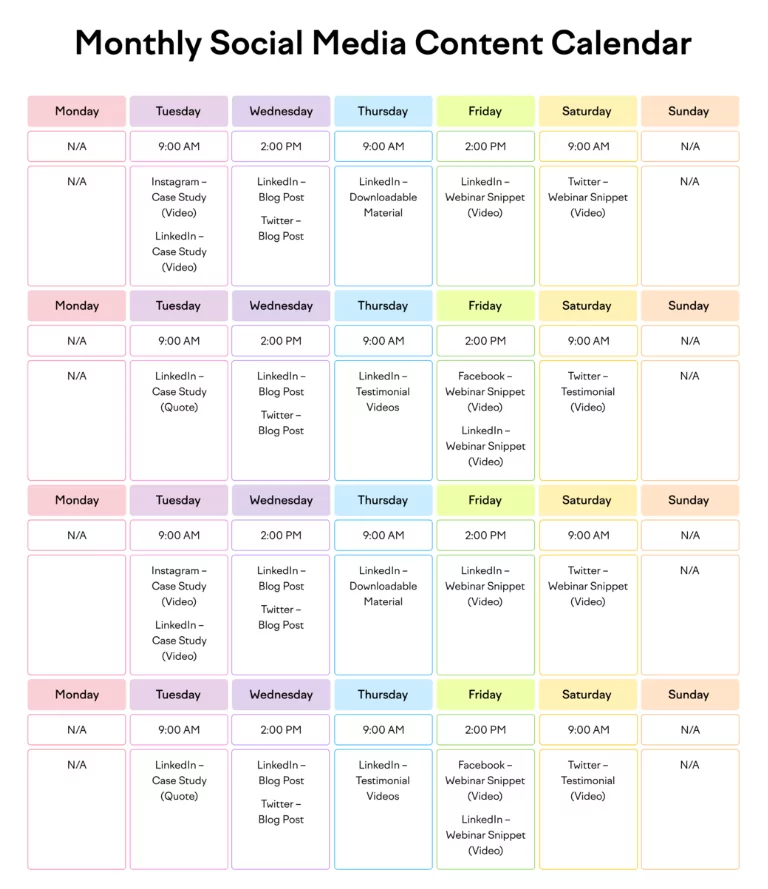
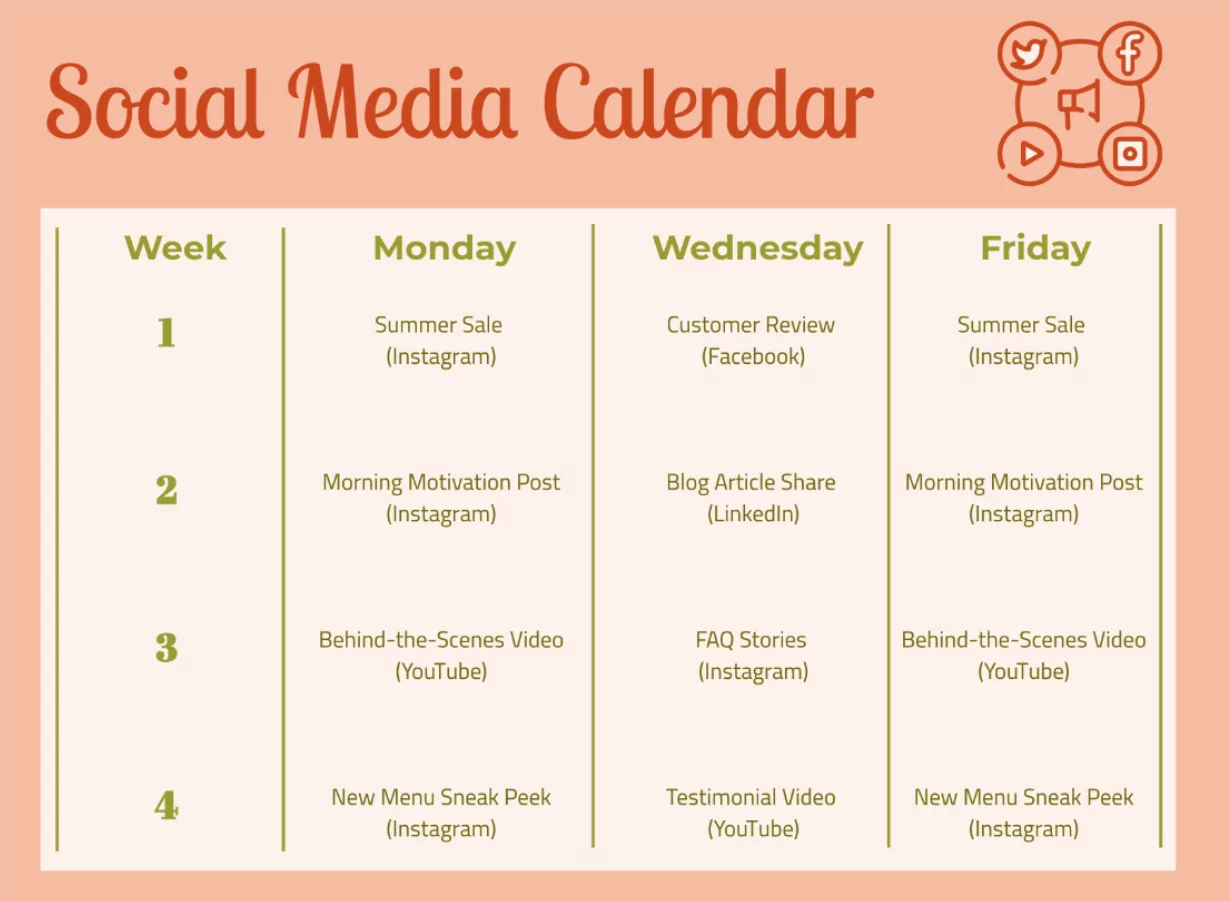
A social media schedule calendar is a visual planning tool that maps content across social platforms over specific time periods—typically weeks or months. Unlike vague content ideas, these calendars provide concrete, time-specific commitments for what content will be published where and when.
A typical social media schedule calendar includes:
- Publication dates and times: Specific days and hours when content goes live
- Platform designation: Which social channels receive each piece of content (Instagram, TikTok, LinkedIn, Facebook, Twitter/X, etc.)
- Content type: Post format (image, video, carousel, story, reel, text-only)
- Content description: What the post contains or its main message
- Hashtags and keywords: Discoverability elements for each post
- Links and CTAs: Call-to-action elements directing followers toward desired actions
- Campaign alignment: Which marketing initiative each post supports
- Performance notes: Space for tracking engagement metrics after posting
Why Social Media Schedule Calendars Matter in Modern Marketing
Consistency Creates Algorithm Favor
Social media algorithms reward consistent posting. Irregular posting patterns confuse platform algorithms, suppressing reach. Scheduled calendars ensure posts appear on predetermined schedules, signaling to algorithms that your account is active and engaged. This consistency improves content visibility and follower reach.
Strategic Planning Replaces Reactive Posting
Without calendars, social media management becomes reactive—posting whatever comes to mind whenever you think of it. Calendars enable proactive strategy where content aligns with business goals, seasonal trends, product launches, and audience engagement patterns. Strategic posting vastly outperforms random posting.
Multi-Platform Coordination
Most brands maintain presence across multiple social platforms simultaneously. Calendars ensure messaging consistency while optimizing content for each platform’s unique audience and format. You might post the same core message across platforms but adapt format, hashtags, and CTAs for each.
Team Collaboration
When teams manage social media, calendars become essential coordination tools. Multiple people understand what content is planned, preventing duplication, ensuring brand voice consistency, and enabling backup coverage if someone is unavailable.
Content Pipeline Management
Calendars prevent last-minute scrambling. With content planned weeks or months ahead, creators have time to produce quality content without rushing. This buffer also allows for content iteration and optimization rather than publishing first-draft material.
Traditional Format: Understanding Calendar Layouts
Monthly Grid Format
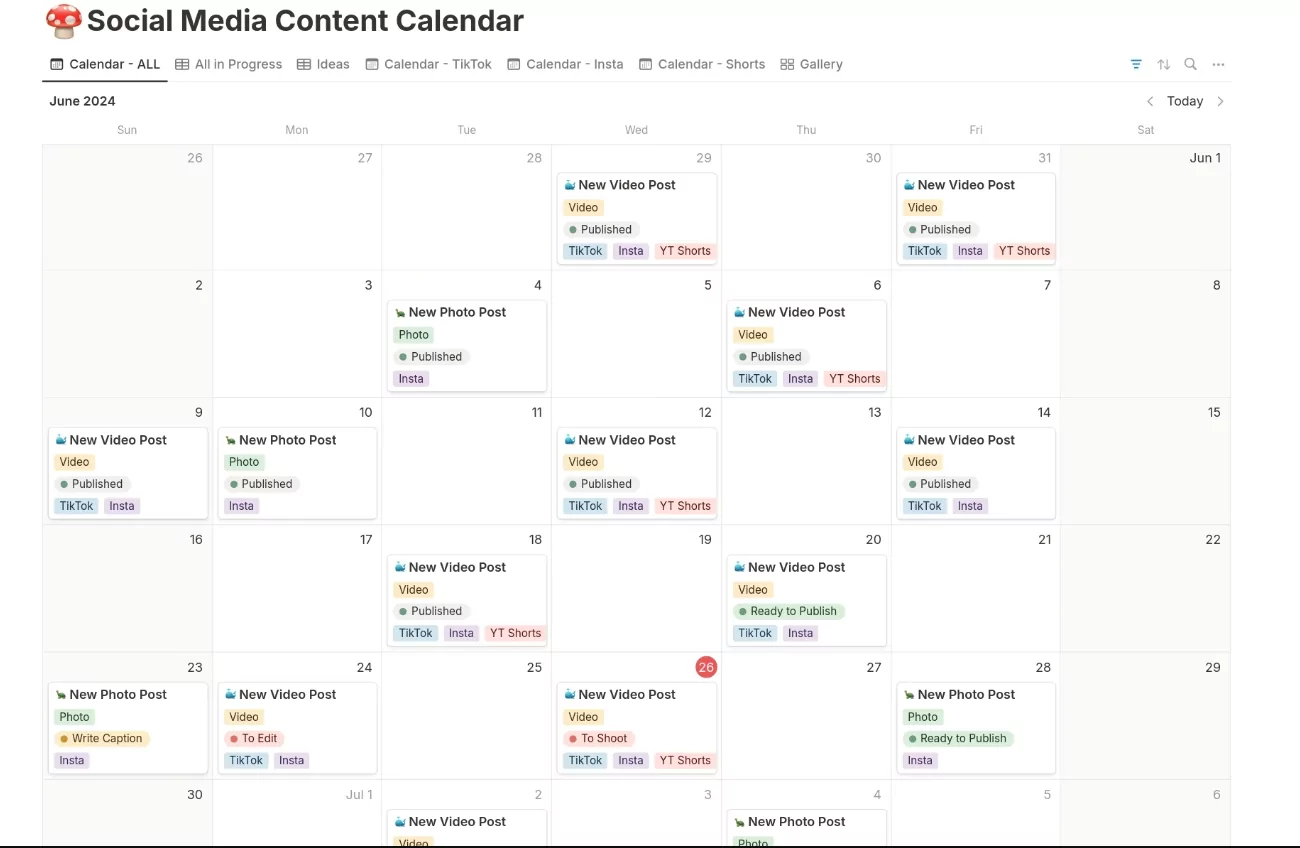
The most common traditional layout displays a calendar grid with dates across columns and time slots down rows. Each cell contains information about that day’s social media content:
- Date in top-left corner
- Platform (Instagram, LinkedIn, etc.) indicated by color or label
- Content preview or description
- Time of posting
- Hashtags or performance notes
Color-coding by platform enables quick visual scanning—red for Instagram, blue for LinkedIn, green for TikTok, etc.
Weekly Breakdown Format
Some calendars zoom in on weekly views, providing more space per day for detailed content information. Monday through Sunday columns display all content scheduled for that week with full descriptions, times, and metadata.
List/Spreadsheet Format
Spreadsheet-based calendars list content chronologically with columns for Date, Time, Platform, Content Type, Description, Hashtags, Links, and Notes. This format suits data analysis and sorting by various criteria.
Platform-Specific Format
Some calendars dedicate separate sections to each platform. One section shows all Instagram content across the month, another shows all LinkedIn content, etc. This organization suits brand managers who think platform-first rather than chronologically.
How to Read and Interpret Social Media Schedule Calendars
Identifying Posting Frequency
Scan the calendar to identify posting patterns. Count total posts per platform monthly and divide by weeks to determine weekly frequency. For example:
“Calendar shows 16 Instagram posts across 4 weeks = 4 Instagram posts weekly”
“Calendar shows 8 LinkedIn posts across 4 weeks = 2 LinkedIn posts weekly”
This frequency understanding helps you assess whether posting volume matches platform expectations and audience capacity.
Recognizing Content Variety
Review content types across the calendar. Does it alternate between different formats? Does one content type dominate? Variety prevents audience fatigue. Look for:
- Mix of educational, entertaining, and promotional content
- Different post formats (carousels, videos, images, text-only)
- Diversity in content topics
- Balance between brand promotion and value-adding content
Calendars dominated by single content types signal an over-reliance on one approach, suggesting opportunity for diversification.
Assessing Campaign Alignment
Identify how calendar content supports business objectives. If the brand launched a new product, does calendar content include posts promoting it? If a seasonal promotion runs in Q4, does calendar content reflect that timing? Misalignment between calendar and business priorities indicates planning problems.
Evaluating Timing Optimization
Notice posting times. Effective calendars post when target audiences are most active. B2B brands might post weekday mornings (9-11 AM) when professionals check work emails. Fitness brands might post evenings (5-7 PM) when people exercise. Review whether posting times make sense for your audience.
Analyzing Hashtag Strategy
Examine hashtags used across calendar content. Effective calendars use consistent branded hashtags while varying topical hashtags. Look for:
- Branded hashtags appearing consistently
- Topic-specific hashtags matching content
- Trending hashtags used strategically
- Hashtag variation preventing repetition fatigue
Tracking CTA Consistency
Identify call-to-action elements. Does calendar content direct followers toward consistent desired actions (website visits, email signups, product purchases, comments)? Scattered or inconsistent CTAs reduce conversion effectiveness.
Creating Modern Social Media Schedule Calendars
Step 1: Define Your Goals and Platform Strategy
Before scheduling content, clarify what you’re trying to achieve. Are you building brand awareness, driving traffic, generating sales, or building community? This focus guides which platforms matter most and what content serves these objectives.
Define which platforms to prioritize. Most brands manage 3-5 platforms actively. Spreading resources across all platforms dilutes attention. Concentrate effort on platforms where your audience congregates.
Step 2: Understand Your Audience and Platform Algorithms
Research when your specific audience is most active. General guidelines suggest:
- Instagram: Peak engagement 11 AM-1 PM and 7-9 PM weekdays
- LinkedIn: Peak engagement 7-9 AM and 12-1 PM weekdays (professionals checking updates)
- TikTok: Peak engagement 6-10 AM and 7-11 PM daily (highly variable by demographic)
- Facebook: Peak engagement 1-3 PM and 8-10 PM
- Twitter/X: Peak engagement 8-10 AM and 5-6 PM weekdays
However, your specific audience may differ. Use platform analytics to determine when your followers are most active. Schedule posts for these peak windows.
Step 3: Establish Posting Frequency
Determine realistic, sustainable posting frequency for each platform:
- Instagram: 3-5 posts weekly (feed), 3-7 stories daily, 2-4 reels weekly
- LinkedIn: 2-4 posts weekly for business accounts
- TikTok: 3-7 videos daily for growth (algorithm favors consistent high volume)
- Facebook: 1-2 posts daily
- Twitter/X: 5-20 tweets daily (highly variable by industry)
Start conservatively. It’s better to maintain consistent lower frequency than over-commit and post sporadically. You can increase frequency once you establish reliable workflows.
Step 4: Content Pillar Development
Define 4-6 content pillars—core topics your brand posts about regularly. For a fitness brand, pillars might include:
- Workout tips and tutorials
- Nutrition and diet advice
- Motivational quotes and transformation stories
- Product announcements and promotions
- Behind-the-scenes team content
- Community features (user-generated content)
Content pillars ensure variety while maintaining focus. As you plan calendar, distribute posts across pillars, preventing over-reliance on any single topic.
Step 5: Content Batching and Production
Create content in batches rather than daily. Spend a day or two filming, photographing, and writing multiple weeks of content. This concentrated production proves more efficient than daily scrambling for content ideas.
Batch production also enables consistency in lighting, backgrounds, and quality—important for brand professionalism.
Step 6: Calendar Population and Scheduling
Fill your calendar with batched content, assigning specific dates and times. Distribute content across content pillars for variety. Identify key dates—product launches, promotional periods, seasonal events—and ensure calendar supports these priorities.
Use scheduling tools to schedule posts days or weeks in advance rather than manually posting. This enables consistency even during vacations or busy periods.
Tools for Creating and Managing Social Media Schedule Calendars
Spreadsheet-Based Systems
Simple Google Sheets or Excel calendars provide flexibility and accessibility. Create columns for Date, Time, Platform, Content Type, Description, Hashtags, Links, and Notes. Color-code rows by platform for visual organization.
Advantages: Free, fully customizable, easy collaboration, no learning curve Disadvantages: No automatic reminders, manual posting required, limited visual preview
Dedicated Social Media Management Tools
Purpose-built tools streamline calendar creation and content management:
- Buffer: Intuitive calendar interface, easy scheduling across platforms, analytics included
- Hootsuite: Comprehensive platform supporting 50+ networks, team collaboration, robust analytics
- Later: Visual calendar design, Instagram-focused tools, content library organization
- Sprout Social: Enterprise-level features, detailed reporting, team workflow management
- ContentCalendar: Minimalist design focused purely on scheduling
- Metricool: Visual calendar, multi-language support, affordable pricing
These tools offer free tiers for small accounts, making professional-grade calendar management accessible.
Native Platform Tools
Meta Business Suite (Facebook, Instagram), LinkedIn Creator Tools, and TikTok Creator Studio include basic calendar and scheduling features. Native tools integrate seamlessly with platforms but offer fewer advanced features than dedicated tools.
Best Practices for Effective Social Media Schedule Calendars
Plan 4-6 Weeks in Advance
Scheduling far ahead enables thoughtful content creation and flexibility to adjust based on trends or news. However, planning too far ahead reduces ability to capitalize on trending topics or real-time opportunities. Four to six weeks represents the optimal balance.
Maintain 80/20 Value-to-Promotional Ratio
Most social media audiences follow brands for valuable content (tips, entertainment, education), not constant promotion. Structure calendars so approximately 80% of content provides value and 20% promotes products or services. This ratio prevents audience fatigue and maintains engagement.
Account for Platform Differences
Don’t copy identical content across platforms. Instead, adapt messaging and format for each platform’s unique audience and algorithm. LinkedIn content emphasizes professionalism, TikTok content emphasizes entertainment, Instagram emphasizes visual aesthetics. Calendar should reflect these platform-specific approaches.
Build in Flexibility
Overly rigid calendars prevent capitalizing on real-time opportunities—trending topics, news events, spontaneous engagement opportunities. Maintain 10-20% calendar space for flexible, reactive content while keeping 80-90% planned ahead.
Test and Optimize Based on Analytics
After posting calendar content, track performance metrics. Which posts generated highest engagement? Which times achieved best reach? Use these insights to refine future calendar planning. Testing and optimization represent the difference between calendars that guide mediocre content versus calendars that drive consistent high performance.
Establish Brand Voice Consistency
Calendar content should reflect consistent brand voice and personality. Review calendar before finalizing to ensure tone, messaging, and personality remain consistent across all posts. Inconsistent voice confuses audiences and dilutes brand identity.
Common Social Media Calendar Mistakes to Avoid
Over-Scheduling Without Flexibility
Calendars planned months ahead without any flexibility miss real-time opportunities. Trending topics, viral moments, and current events create engagement opportunities unavailable through pre-planned content. Build buffer space for responsive posting.
Ignoring Platform-Specific Best Practices
Copying identical content across platforms ignores each platform’s unique algorithm, audience expectations, and format optimization. Effective calendars optimize content for each platform while maintaining core messaging.
Inconsistent Posting Frequency
Sporadic posting reduces algorithm favor and audience expectations. Better to post consistently at lower frequency (3x weekly) than erratically at higher frequency (1x-5x weekly varying). Consistency matters more than volume.
Neglecting Audience Interaction
Calendars planning content outflow often ignore audience interaction. Social media requires two-way conversation. Schedule time for responding to comments, messages, and engaging with audience content. One-way broadcasting defeats social media’s purpose.
Failing to Track Performance
Posting content without tracking performance metrics prevents optimization. Effective calendar management includes reviewing analytics, identifying top-performing content, and adjusting future calendars accordingly.
Content Pillar Imbalance
Allowing calendar to skew heavily toward single content types creates audience fatigue. Ensure calendar distributes content across defined pillars, maintaining variety and audience interest.
Adapting Traditional Calendars for Today’s Social Media Landscape
Account for Algorithm Changes
Platform algorithms evolve constantly. What worked last year may not work today. Regularly review and adjust calendar strategy based on current algorithm priorities. Instagram increasingly rewards Reels over static images. TikTok’s algorithm prioritizes watch time and completion rate. LinkedIn rewards professional thought leadership. Modern calendars must account for these changing priorities.
Incorporate Video Content Heavily
Video content receives priority algorithmic treatment across platforms. Modern social calendars should dedicate 50-70% of posts to video content (Reels, TikTok, Stories) with static images receiving smaller allocation.
Balance Evergreen and Timely Content
Evergreen content—tips, tutorials, timeless advice—provides consistent value and performs well months after posting. Timely content—seasonal topics, current events, trending subjects—generates immediate engagement. Effective calendars include both: 70% evergreen content providing consistent foundation plus 30% timely content capturing current interest.
Plan for Trend Participation
While you can’t predict exact trends, you can identify categories of trends likely relevant to your brand. Food brands should watch for food trend participation opportunities. Tech brands should monitor industry news for commenting opportunities. Calendar should include dedicated space for trend-responsive content.
Integrate User-Generated Content
Modern calendars should include user-generated content (UGC) strategy. Feature customer posts, testimonials, and community-created content. This content builds community, provides authentic social proof, and often generates exceptional engagement. Reserve 10-20% of calendar space for UGC.
Team Social Media Calendars: Collaboration and Workflows
Role Definition
Clarify team roles within calendar management:
- Strategy Lead: Defines posting frequency, content pillars, and platform strategy
- Content Creators: Produce photography, videography, and written content
- Copywriter: Writes captions and ad copy
- Calendar Manager: Organizes content chronologically and schedules posts
- Community Manager: Responds to comments, messages, and engages audience
- Analytics Lead: Tracks performance and identifies optimization opportunities
Defining roles prevents confusion and ensures all calendar tasks receive attention.
Approval Workflows
Establish content approval processes before scheduling. Calendar managers might draft content ideas, copywriters refine captions, brand managers approve before scheduling. Clear workflows prevent unapproved or off-brand content from posting.
Collaborative Calendar Tools
Use tools enabling team collaboration with comments, approval features, and revision tracking. Later, Hootsuite, and Sprout Social all support team workflows better than simple spreadsheets.
Measuring Social Media Calendar Success
Key Performance Indicators
Track these metrics to evaluate calendar effectiveness:
- Reach: Number of people seeing calendar content
- Engagement Rate: Percentage of viewers interacting with content (likes, comments, shares)
- Click-Through Rate: Percentage clicking links to external resources
- Follower Growth: New followers accumulated through calendar posting
- Conversions: Users completing desired actions (purchases, signups, etc.)
- Sentiment: Percentage of comments positive vs. negative
- Share of Voice: How often brand appears in relevant social conversations versus competitors
Analytics Review Cadence
Review analytics weekly to identify immediate patterns, monthly to assess broader trends, and quarterly for strategic evaluation. Use insights to optimize future calendars. Top-performing content types should receive increased allocation, underperforming content types should be reduced or eliminated.
Conclusion: Traditional Calendars, Modern Execution
Social media schedule calendars remain essential strategic tools despite platform evolution. By understanding how to read, create, and optimize these calendars, brands and creators ensure consistent, strategic, high-performing social media presence. The fundamentals—planning ahead, maintaining consistency, distributing content strategically, and optimizing based on performance—endure while tactics evolve.
Start with a simple monthly calendar documenting your current posting. Identify patterns, inconsistencies, and optimization opportunities. Then implement a formal calendar system using spreadsheets or dedicated tools. Define content pillars, establish posting frequency, and plan 4-6 weeks ahead. After each week, review analytics and adjust future calendars based on performance insights.
Within months, consistent calendar management transforms social media from chaotic improvisation into strategic asset driving measurable business results. The difference between average and excellent social media presence often comes down to the discipline and strategy embodied in effective schedule calendars.
